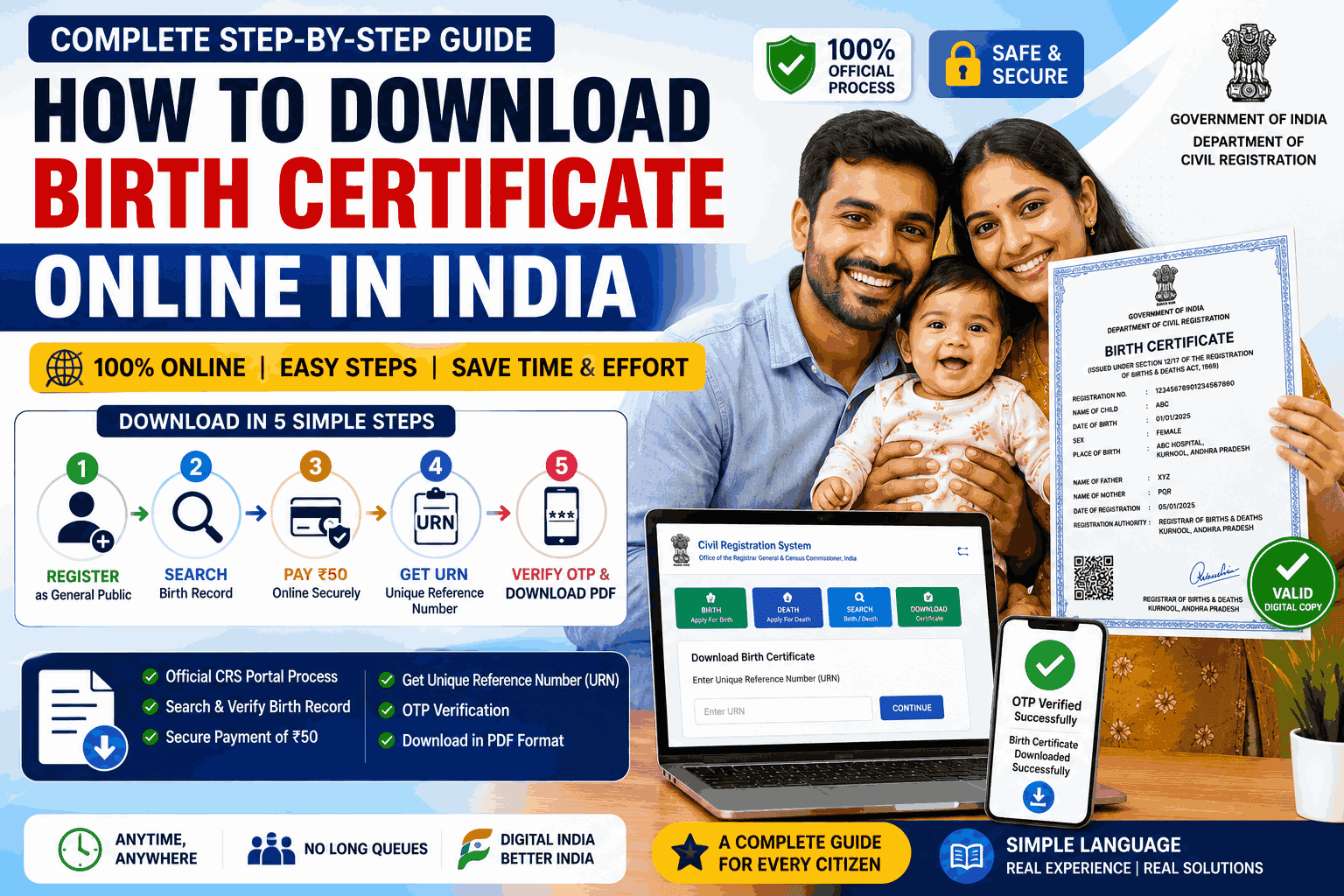
How to Download Birth Certificate Online in India
How to Download Birth Certificate Online in India is one of the most searched topics by parents and citizens who need a digital copy of their Birth Certificate for official purposes. Whether it is for Aadhaar enrolment, school admission, passport application, PAN card, or government schemes, a Birth Certificate is an essential document that serves as proof of a person’s birth and identity.
The Government of India has made the process easier by allowing citizens to download Birth Certificates online through the Civil Registration System (CRS) Portal. However, many users still find the process confusing because it involves multiple steps, including account registration, searching the birth record, paying the applicable fee, obtaining a Unique Reference Number (URN), and completing OTP verification before downloading the certificate.
I personally faced this issue while trying to download my daughter’s Birth Certificate. Although the birth was successfully registered, I was unable to download the certificate because the mobile number linked to the birth registration record was not available for OTP verification. After spending considerable time understanding the CRS Portal, speaking with the concerned authorities, and identifying the actual reason behind the issue, I learned the complete process and the common mistakes that many parents encounter.
Based on that real experience, this comprehensive guide explains how to download a Birth Certificate online in India in a simple, step-by-step manner. It also covers the registration process, payment procedure, URN generation, OTP verification, common errors, practical solutions, and frequently asked questions. By the end of this guide, you will have a clear understanding of the entire process and will be able to download your Birth Certificate with confidence.
What is the Civil Registration System (CRS)?
The Civil Registration System (CRS) is the official online platform developed by the Office of the Registrar General & Census Commissioner, India, under the Ministry of Home Affairs.
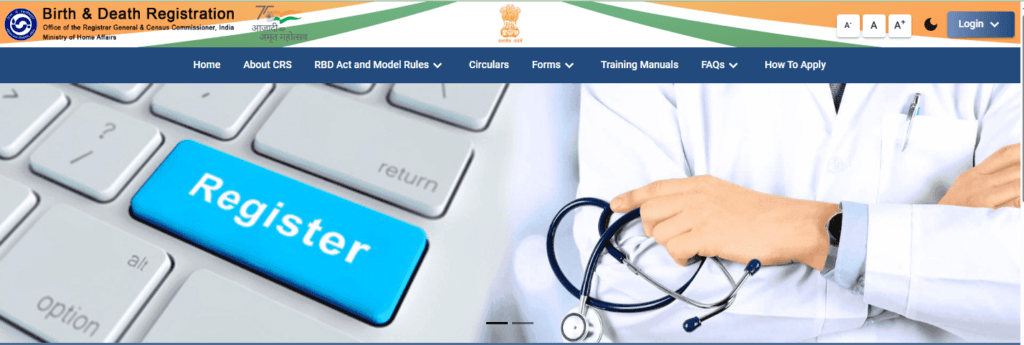
It is used to register births and deaths across India and allows citizens to access their records digitally.
Through the CRS Portal, users can:
- Search Birth Registration Records
- Search Death Registration Records
- Download Birth Certificates
- Download Death Certificates
- Verify registration details
- Access digital certificates from anywhere
The portal aims to reduce paperwork and make civil registration services accessible online.
Key Highlights
| Particular | Details |
|---|---|
| Service | Birth Certificate Download |
| Portal | Civil Registration System (CRS) |
| Mode | Online |
| Registration Required | Yes |
| Payment | ₹50 (where applicable, based on the portal process) |
| Download Format | |
| OTP Required | Yes |
| Official Website | https://dc.crsorgi.gov.in/crs/ |
Why is a Birth Certificate Important?
Many parents underestimate the importance of a Birth Certificate until they need it. However, it is one of the most essential government-issued documents.
A Birth Certificate is commonly required for:
- Aadhaar Card enrolment
- School admission
- Passport application
- PAN Card application
- Government welfare schemes
- Property inheritance
- Insurance claims
- Visa applications
- Proof of age
- Voter registration (later in life)
Keeping a digital copy of the certificate can save significant time in the future.
Before You Start: Keep These Details Ready
To avoid interruptions during the process, keep the following information ready before logging into the CRS Portal.
Personal Details
- Child’s Name (if registered)
- Date of Birth
- Gender
- Father’s Name
- Mother’s Name
- Place of Birth
- Hospital Name
- Registration Number (if available)
Contact Details
- Registered Mobile Number
- Email ID
Payment Method
- UPI
- Debit Card
- Credit Card
- Net Banking
Complete Birth Certificate Download Process
The online process consists of four simple stages.
- Register as General Public.
- Search Birth Registration.
- Pay the required fee.
- Download the Birth Certificate using the Unique Reference Number.
Let’s understand each step in detail.
Step 1 – Register as General Public on the CRS Portal
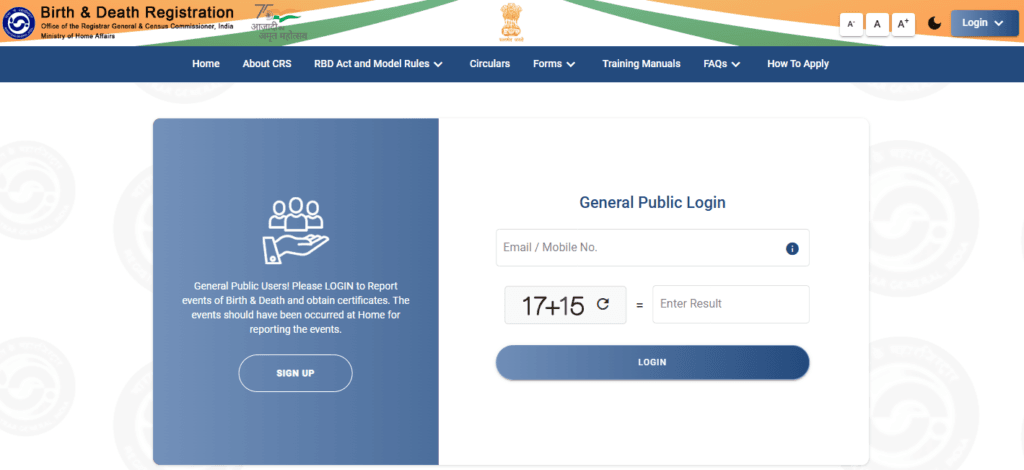
The first step is creating an account on the official CRS Portal.
Visit:
On the homepage, click on:
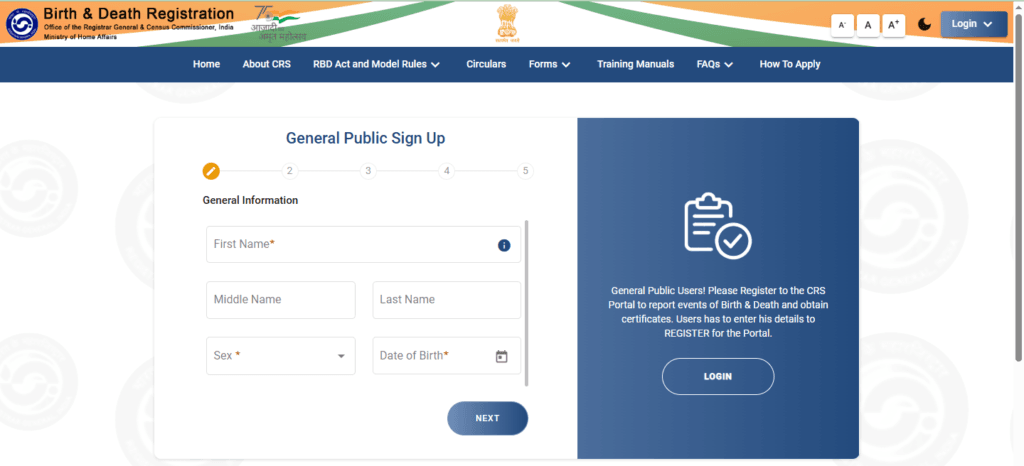
General Public Sign Up
Fill in the required details:
- Full Name
- Mobile Number
- Email Address
- Password
- State
- District
After entering all details, submit the registration form.
You may receive verification through your registered mobile number or email address depending on the portal’s current process.
Once verification is completed successfully, your account becomes active.
Step 2 – Login to Your Account
After registration,
Return to the CRS Portal login page.
Enter:
- Registered Mobile Number or User ID
- Password
- Captcha Code
Click Login.
After successful login, you will reach the user dashboard where different birth and death-related services are available.
Step 3 – Search Birth Register
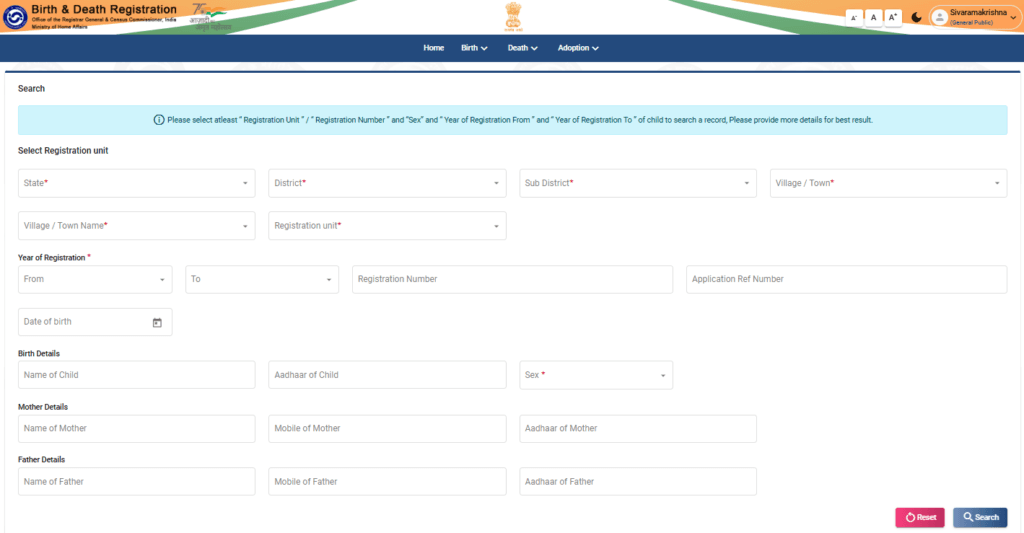
From the dashboard, select:
Birth → Search Birth Register
This is one of the most important steps because the system will search the national birth registration database.
You may be asked to enter details such as:
- Child Name
- Date of Birth
- Father’s Name
- Mother’s Name
- State
- District
- Registration Year
After entering accurate details, click Search.
If the record is available, it will appear on your screen.
Always verify that all information displayed matches your child’s details before proceeding to the payment stage.
Step 4 – Pay the Birth Certificate Download Fee
Once your birth record appears on the screen, carefully verify all the information before proceeding. Make sure the child’s name, date of birth, parents’ names, and place of birth are correct.
If everything looks accurate, click on the Proceed to Payment button.
Currently, the CRS Portal requires users to pay a ₹50 fee (where applicable as per the portal process) to generate a downloadable Birth Certificate.
Available Payment Methods
The portal supports multiple secure payment options, including:
- UPI (PhonePe, Google Pay, BHIM, Paytm, etc.)
- Debit Card
- Credit Card
- Net Banking
Choose your preferred payment method and complete the transaction.
Tip: Do not refresh or close your browser while the payment is being processed. Interrupting the payment may result in a failed transaction or delay in generating your download request.
What Happens After Successful Payment?
After the payment is completed successfully, the CRS Portal processes your request and generates a Unique Reference Number (URN).
This number is extremely important because it is required for downloading the Birth Certificate.
The URN is usually displayed on the confirmation page after payment. In some cases, it may also be sent to your registered mobile number or email.
Important
Before leaving the page, make sure you:
- Note down the Unique Reference Number.
- Take a screenshot of the confirmation page.
- Save or print the payment receipt for future reference.
If you lose the URN, downloading the certificate later may become difficult.
What is a Unique Reference Number (URN)?
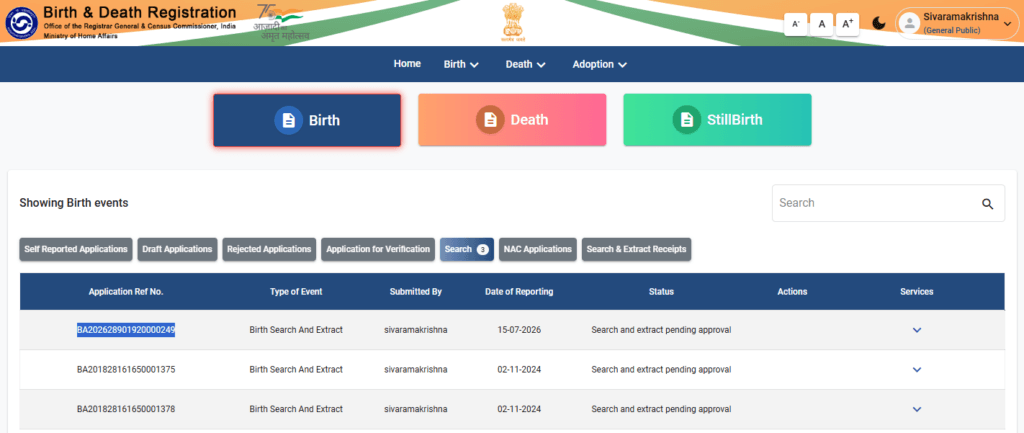
The Unique Reference Number (URN) is a unique identification number generated after your payment is successful.
Think of it as a tracking number for your certificate download request.
Without this number, you cannot proceed to the final download step.
Why is the URN Important?
The URN helps the CRS Portal:
- Identify your payment.
- Verify your download request.
- Send OTP verification to the registered mobile number.
- Generate the Birth Certificate PDF.
Always keep this number safe until your certificate is downloaded.
Step 5 – Download the Birth Certificate
Once you have your URN, you can download the Birth Certificate from the dedicated download page.
Open the official CRS Certificate Download page.
Certificate Download Page:
https://dc.crsorgi.gov.in/crs/dwnld
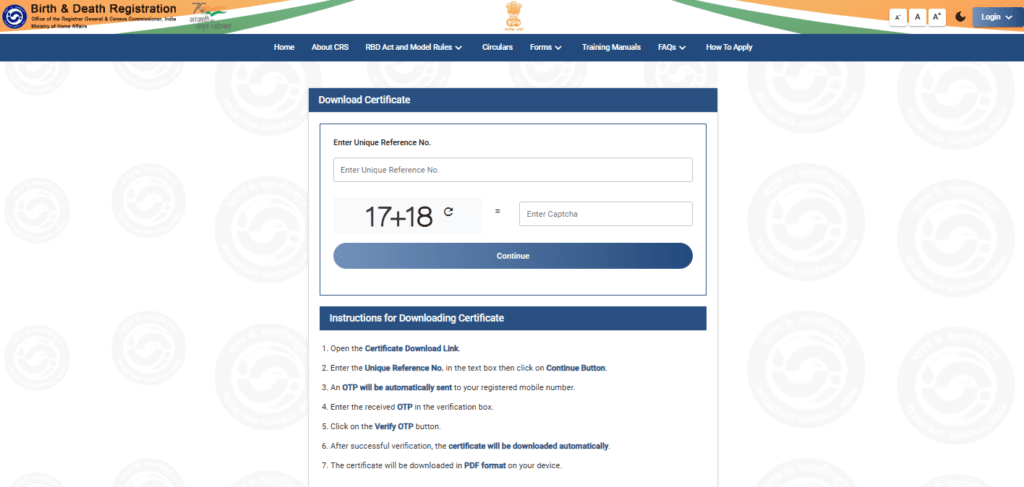
Now follow these steps carefully:
Step 1
Enter the Unique Reference Number (URN) in the provided text box.
Step 2
Click the Continue button.
Step 3
The system will automatically send a One-Time Password (OTP) to the registered mobile number linked to the birth registration.
Step 4
Enter the OTP in the verification box.
Step 5
Click on Verify OTP.
Step 6
If the OTP is correct, your Birth Certificate will be downloaded automatically in PDF format.
You can save it on your mobile or computer and print it whenever required.
Understanding the OTP Verification Process
The OTP verification step is introduced to protect citizens’ personal information.
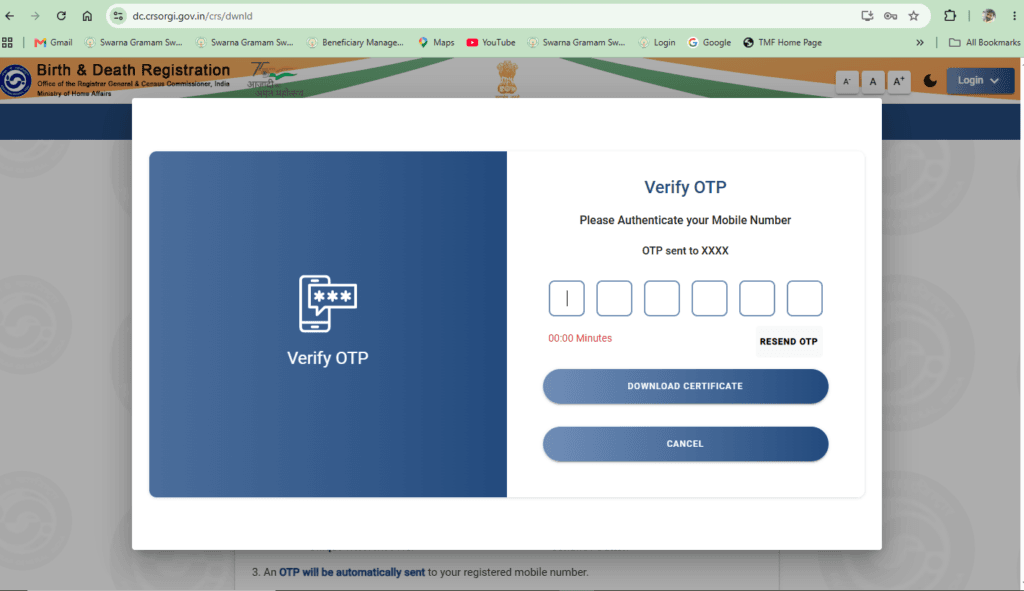
Since a Birth Certificate contains sensitive details, the portal ensures that only the person associated with the registered mobile number can download the document.
Without OTP verification, the certificate cannot be downloaded.
OTP Not Received? Here is the Most Common Reason
One of the biggest problems faced by users is not receiving the OTP.
Many people assume there is a technical problem with the portal. However, in most cases, the actual reason is different.
The Most Common Cause
The mobile number was not recorded when the birth registration was completed.
This usually happens when the birth details are entered by the hospital or the local registration authority without adding the parent’s mobile number.
As a result:
- The Birth Registration exists.
- Payment is successful.
- URN is generated.
- But the OTP cannot be delivered because no valid mobile number is available in the registration record.
This is one of the most common issues faced by parents.
My Personal Experience
While trying to download my daughter’s Birth Certificate, I completed all the online steps successfully.
- I registered on the CRS Portal.
- I searched and found the birth record.
- I paid the required fee.
- I received the Unique Reference Number.
However, when I reached the final download page, the OTP never arrived.
After contacting the concerned authorities and understanding the complete process, I discovered that the mobile number had not been entered at the time of birth registration in the hospital.
Only after identifying this issue did I understand why the download process was failing.
That experience inspired me to prepare this detailed guide so that other parents can avoid the same confusion.
What Should You Do If Your Mobile Number Was Not Registered?
If you suspect that your mobile number was not linked during birth registration, follow these steps.
Step 1
Visit the hospital where the birth was originally registered.
For example, if the birth was registered at a Government Hospital, contact the Birth Registration section or Medical Records section.
Step 2
Explain that you are unable to receive the OTP because the registered mobile number is missing.
Step 3
If the hospital directs you to the local Registration Authority, visit the concerned Municipal Office, Gram Panchayat, or Registrar of Births and Deaths.
Step 4
Request them to verify your registration details and guide you on updating the mobile number, if permitted under their process.
Step 5
After the mobile number is updated in the records (if applicable), repeat the download process through the CRS Portal.
Birth Record Not Found? Possible Reasons
Sometimes users cannot find their child’s birth record on the portal.
This can happen due to several reasons.
Incorrect Date of Birth
Even a one-day mistake will prevent the portal from finding the record.
Always check the date carefully.
Incorrect Spelling
Try different spellings of:
- Child’s Name
- Father’s Name
- Mother’s Name
Sometimes records are saved with minor spelling differences.
Wrong Registration Year
Make sure you select the correct registration year.
The birth year and registration year may not always be the same.
Wrong District
Select the district where the birth was actually registered.
Choosing the wrong district will not display the record.
Record Not Yet Uploaded
Recently registered births may take some time before they become available online.
If the registration is new, wait a few days and search again.
Payment Successful But Certificate Not Downloading
Sometimes the payment is completed, but the certificate is not immediately available.
Possible reasons include:
- Server delay.
- Temporary maintenance.
- Payment synchronization delay.
- High traffic on the portal.
Solution
- Wait for a few hours.
- Log in again.
- Use the same URN.
- Retry the download process.
If the issue continues, contact the concerned registration authority with your payment receipt and URN.
Invalid Unique Reference Number (URN)
If the portal shows Invalid URN, check the following:
- Ensure that you entered the correct URN.
- Avoid extra spaces before or after the number.
- Confirm that the payment was successful.
- Wait a few minutes if the payment was completed recently, as the URN may take some time to become active.
If the problem persists, keep your payment details ready and contact the concerned authority for assistance.
Common Errors and Their Solutions
| Problem | Possible Reason | Solution |
|---|---|---|
| OTP not received | Mobile number not registered | Contact the Birth Registration Authority and verify the registered mobile number. |
| Record not found | Incorrect search details | Check the child’s name, date of birth, district, and registration year. |
| Payment successful but download unavailable | Temporary server delay | Wait for some time and try again using the same URN. |
| Invalid URN | Incorrect URN or processing delay | Re-enter the URN carefully and try again after a short interval. |
| Certificate not downloading | Browser or portal issue | Refresh the page, clear the browser cache, or try a different browser/device. |
Is the Downloaded Birth Certificate Valid?
Yes. A Birth Certificate downloaded from the official Civil Registration System (CRS) Portal is generally considered a valid digital copy, provided it has been issued through the official government system and contains the required registration details.
Most government departments, schools, passport offices, banks, and other institutions accept digitally downloaded Birth Certificates. However, if any authority specifically asks for a certified physical copy, you may need to obtain one from the concerned registration authority.
Note: Always verify the requirements of the department where you are submitting the Birth Certificate.
How to Verify Your Downloaded Birth Certificate
After downloading the PDF, do not assume everything is correct. Spend a few minutes checking the details.
Verify the following information:
- Child’s Name
- Date of Birth
- Gender
- Father’s Name
- Mother’s Name
- Place of Birth
- Registration Number
- Registration Date
- Registration Authority
- QR Code (if available)
If you notice any spelling mistakes or incorrect information, contact the concerned Birth Registration Authority immediately for correction.
Common Mistakes to Avoid
Many users face delays simply because of avoidable mistakes. Here are some common errors:
1. Registering with the Wrong Mobile Number
Always register using a mobile number that you actively use, as it may be required for OTP verification.
2. Entering Incorrect Search Details
Even a small spelling mistake or an incorrect date of birth can prevent the portal from finding the birth record.
3. Closing the Browser During Payment
Do not refresh or close the browser window while making the payment.
4. Forgetting to Save the Unique Reference Number
The URN is essential for downloading the certificate. Save it immediately after payment.
5. Ignoring the Payment Receipt
Always keep a copy of the payment receipt until the certificate is successfully downloaded.
6. Trying Multiple Payments
If the payment has already been debited, avoid making another payment immediately. Wait for confirmation or contact the support team if necessary.
Expert Tips for a Smooth Download Process
Based on practical experience, the following tips can save you time:
- Use the latest version of Google Chrome, Microsoft Edge, or Mozilla Firefox.
- Ensure that your internet connection is stable during payment and OTP verification.
- Keep all birth registration details ready before you start.
- Double-check the spelling of names before searching.
- Save screenshots of important steps, such as the payment confirmation and URN.
- Download the PDF immediately after OTP verification and keep a backup copy in cloud storage or email.
What If You Still Cannot Download the Birth Certificate?
If you have tried all the steps but are still unable to download the certificate, you can:
- Visit the hospital where the birth was registered.
- Contact the local Registrar of Births and Deaths.
- Visit the Municipal Corporation, Municipality, or Gram Panchayat office (depending on the registration authority).
- Keep your payment receipt, URN, and identity proof ready while seeking assistance.
Providing accurate information will help the officials resolve your issue more quickly.
Frequently Asked Questions (FAQs)
1. Can I download my Birth Certificate online?
Yes. If your birth has been registered and is available in the CRS Portal, you can download it online after completing the required process.
2. Is registration mandatory on the CRS Portal?
Yes. You must first create a General Public account before accessing the Birth Certificate download services.
3. How much is the fee for downloading a Birth Certificate?
The portal currently charges ₹50 for the download process where applicable. Always check the portal for the latest fee structure.
4. What is a Unique Reference Number (URN)?
The URN is generated after successful payment and is required to download the Birth Certificate.
5. Why am I not receiving the OTP?
The most common reason is that the mobile number linked to the birth registration record is missing or incorrect. Network issues may also delay OTP delivery.
6. Can I download the certificate without OTP?
No. OTP verification is a mandatory security step.
7. What should I do if my mobile number was not registered?
Contact the hospital or the concerned Birth Registration Authority to verify your registration details and seek guidance on updating the mobile number if permitted.
8. What if my birth record is not found?
Check the spelling of names, date of birth, district, and registration year. If the problem continues, contact the registration authority.
9. Can I use the downloaded PDF for official purposes?
In many cases, yes. However, always confirm the specific document requirements of the department where you are submitting it.
10. Is the CRS Portal available throughout India?
The CRS Portal is a national platform, but the availability of online services may depend on how the birth records have been digitized by the respective State or local registration authority.
11. Can I download an old Birth Certificate?
If the birth record has been digitized and is available in the CRS database, you may be able to download it online.
12. What should I do if the payment was deducted but the download is unavailable?
Wait for some time, log in again, and retry using the same URN. If the issue persists, contact the concerned authority with your payment details.
13. Can someone else download my Birth Certificate?
Only if they have access to the required details and can complete the OTP verification process linked to the registered mobile number.
14. Which browsers work best with the CRS Portal?
Google Chrome, Microsoft Edge, and Mozilla Firefox generally provide the best experience.
15. Is there any expiry for the downloaded Birth Certificate PDF?
No. However, if you need a fresh copy later, you can download it again (subject to the portal’s rules and access process).
Official Resources
For safe and secure access, always use the official government websites:
- CRS Portal: https://dc.crsorgi.gov.in/crs/
- Certificate Download: https://dc.crsorgi.gov.in/crs/dwnld
Avoid using unofficial websites or third-party portals that claim to provide Birth Certificates.
Final Thoughts
Downloading a Birth Certificate through the CRS Portal is a convenient facility introduced by the Government of India. However, many users face challenges because they are unfamiliar with the registration, payment, URN, and OTP verification process.
This guide was created based on real-world experience to simplify the process for parents and citizens. By following each step carefully and ensuring that the birth registration details are accurate—especially the registered mobile number—you can avoid unnecessary delays and successfully download your Birth Certificate.
If you found this guide helpful, consider sharing it with your family and friends. It may save them valuable time when they need to download a Birth Certificate online.
About the Author
Sivaramakrishna Chindukuri is the founder of National Info Desk, a platform dedicated to providing accurate, easy-to-understand information on Government Services, Government Schemes, Job Notifications, and citizen-centric digital services in India.
With hands-on experience using various government portals and online public service platforms, he focuses on creating practical, step-by-step guides based on real-world experience. His articles are written to help citizens complete government-related processes with confidence while avoiding common mistakes and unnecessary delays.
For this guide, the author personally went through the complete Birth Certificate download process on the Civil Registration System (CRS) Portal. After facing issues during OTP verification and understanding the procedures involved, he documented the entire process in simple language to help other parents and citizens navigate the system more easily.
Through National Info Desk, his goal is to make government services simple, accessible, and understandable for everyone by publishing reliable, well-researched, and user-friendly content.